Abstract
Physical DRAM is bounded in capacity and far more expensive per gigabyte than secondary storage. Demand Paging uses secondary storage (swap space or backing store) to make physical RAM function as a high-speed cache for a vastly larger virtual memory space. Pages are loaded into RAM only when referenced, triggering a Page Fault exception when an application accesses an unallocated or swapped-out virtual page.
- Category: Virtual Memory Storage Architecture
- Core Concept: Using secondary disk storage as a backing pool for physical RAM.
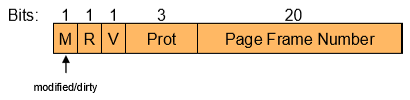
- Key Hardware Primitive: Valid / Present bit in the Page Table Entry.
The Physical Memory Capacity Limit
DRAM provides low latency and high bandwidth, but motherboard capacity is limited. Disk drives and SSDs provide terabytes of storage at low cost, but operate with higher access latency.
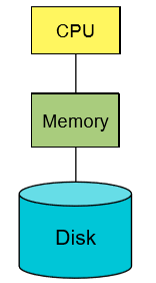
Demand paging exploits program locality to store active pages in physical RAM while parking unused pages on disk in a swap file (backing store):
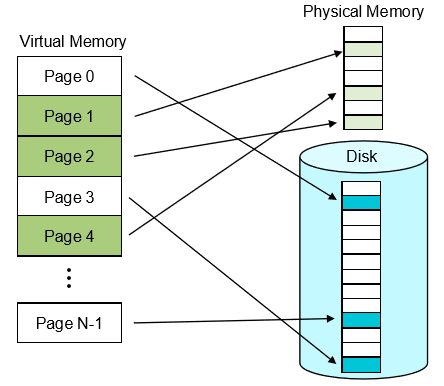
This provides applications with the illusion of vast memory at main memory speeds.
The Page Fault Handling Lifecycle
When an application accesses a virtual page stored in the swap file, the hardware PTE valid bit is 0. This triggers a hardware exception called a Page Fault.
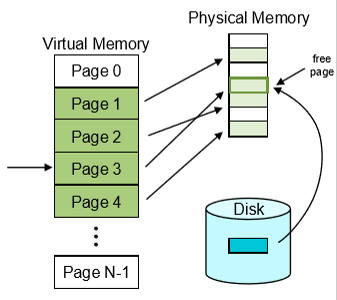
Step-by-Step Fault Resolution
- Memory Reference: The CPU attempts to execute a memory access instruction (e.g.,
MOVorLOAD). - Hardware Exception: The MMU detects
Valid = 0in the PTE, halts instruction execution, saves the faulting virtual address in a special register (badvaddr), and traps to the OS. - Page Fault Handler: The OS page fault handler locates a free page frame in physical memory. If RAM is full, it evicts an existing page to disk using a page replacement algorithm.
- Disk I/O Read: The OS reads the requested page from the swap space into the allocated physical frame.
- PTE Update: The OS updates the PTE with the physical frame number, sets
Valid = 1, and updates the TLB. - Instruction Restart: The CPU returns from the trap handler and re-executes the exact instruction that caused the fault.
Paging Policies & Page Replacement
- Page Fetching:
- Demand Paging: Load pages only when explicitly referenced by a fault.
- Prefetching: Predict future page references and load contiguous pages in advance.
- Page Eviction & Dirty Bit:
- When physical RAM is full, the OS reclaims a physical frame by evicting its page to disk.
- Clean Pages: If the PTE Dirty Bit is
0(unmodified), the OS discards the in-memory page without writing to disk because the disk copy is already identical. - Dirty Pages: If the Dirty Bit is
1(modified), the OS must write the page contents to the swap file before reclaiming the frame.
Causes of Page Faults
The page fault handler categorizes memory faults into distinct conditions based on address space state:
| Fault Cause | Hardware / PTE State | OS Resolution |
|---|---|---|
| Swapped Page Fault | Valid = 0, address maps to swap space file. | Fetch page from disk backing store into RAM and resume process. |
| First-Touch Allocation | Valid = 0, address is in a valid virtual region but unallocated. | Allocate a fresh zeroed physical frame without reading disk. |
| Invalid Address Access | Address falls outside all allocated virtual memory segments. | Raise a segmentation fault (SIGSEGV) to terminate the process. |
| Protection Fault | Valid = 1, but operation violates permissions (e.g., write to read-only page). | Abort process or execute Copy-on-Write page replication. |
Complete Address Translation Walk for Swapped Pages
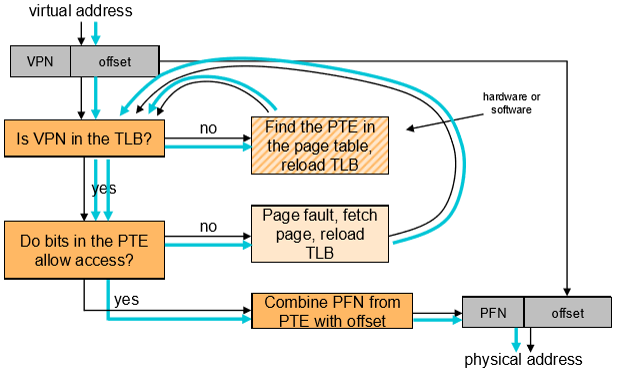
- Query the TLB for the target VPN (TLB Miss).
- Walk the page table in memory to locate the Page Table Entry.
- Detect
Valid = 0in the PTE, triggering a Page Fault trap. - Execute the OS Page Fault Handler: fetch the page from swap space into RAM.
- Update the PTE (
Valid = 1) and insert the new mapping into the TLB. - Re-query the TLB (TLB Hit), translate the physical address, and execute the memory access.