Abstract
File systems support Aliasing—referencing a single underlying file under multiple names or path locations—via Hard Links and Symbolic (Soft) Links. Managing these aliases involves specific kernel lifecycle operations for file creation, atomic renaming (
rename), and reference-counted deletion (unlink).
Hard Links vs. Symbolic (Soft) Links
Hard Links
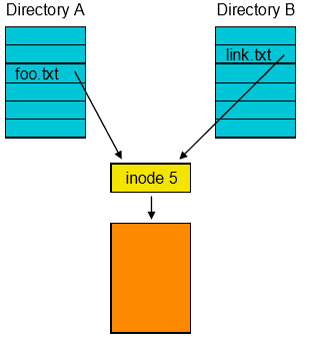
A Hard Link is a directory entry that maps a filename directly to an existing inode number.
- Syscall & Command: Created via the
linksystem call (ln target alias). - Mechanics: Points directly to the target file’s inode. All hard links to a file share identical inode numbers, permissions, and ownership.
- Directory Hard Links:
.(current directory) and..(parent directory) are system-managed hard links to directory inodes. - Limitations:
- Users cannot manually create hard links to directories (prevents circular directory loops).
- Cannot span across different file systems (inodes are local to a specific file system volume).
Symbolic (Soft) Links
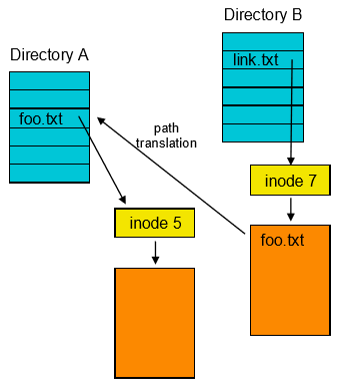
A Symbolic Link is a distinct, special file whose stored content is a text string representing another file’s path name.
- Syscall & Command: Created via the
symlinksystem call (ln -s target alias). - Mechanics: Possesses its own unique inode flagged as a symlink. During path name translation, the file system reads the stored path string and restarts translation from that path.
- Capabilities & Trade-offs:
- Can link across different file systems and point to directories.
- Can become a “dangling link” if the target file is moved or deleted.
- Slower than hard links due to extra path lookup iterations.
Comparison Summary
| Attribute | Hard Link | Symbolic (Soft) Link |
|---|---|---|
| Target Pointer | Points directly to target Inode | Stores text string of target Path |
| System Call | link() (ln file alias) | symlink() (ln -s file alias) |
| Inode Identity | Identical inode number as target | Unique inode number (flagged as symlink) |
| Cross-Filesystem | No | Yes |
| Directory Links | No (restricted to OS . and ..) | Yes |
| Dangling Pointers | Impossible (held by reference count) | Possible (if target path is deleted) |
| Performance | Direct lookup | Slower (requires extra path translation) |
File Lifecycle Operations
1. File Creation Sequence
Creating a new file (e.g., new.txt) follows a strict allocation workflow:
- Allocate an inode
- Initialize the metadata (owner, protection, timestamp, etc)
- Update inode bitmap
- Allocate a directory entry
- Entry maps
new.txtto the allocated inode
- Entry maps
- When process starts writing, allocate data blocks
- Update inode to point to allocated data blocks
- Update data block bitmap
- Continue to allocate blocks on demand
2. File Renaming (rename)
Rather than allocating a new file, copying data blocks, and deleting the old file, the rename system call (mv old new) operates atomically at the directory level:
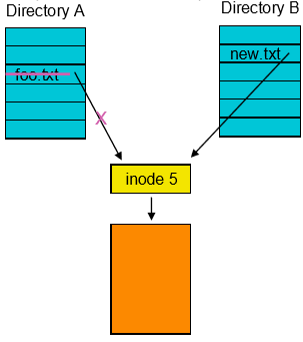
- Create a new directory entry mapping the new name to the existing inode.
- Remove the old directory entry.
- Data blocks and inode contents remain entirely untouched.
3. File Deletion & Unlinking (unlink)
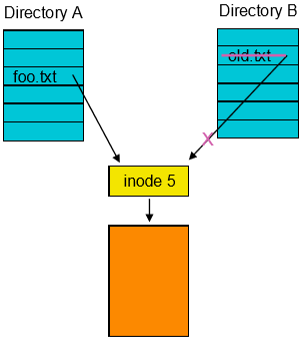
In Unix, file deletion uses the unlink system call (rm old.txt), operating on directory entries and inode link counts:
flowchart TD
    Rm["Call unlink('old.txt')"] --> RemEntry["Remove directory entry for 'old.txt'"]
    RemEntry --> DecRef["Decrement Inode Reference Count (Link Count)"]
    DecRef --> CheckRef{"Remaining Link Count > 0?"}

    CheckRef -->|"Yes"| Done["Done (Other hard links remain intact)"]
    CheckRef -->|"No"| CheckOpen{"Is file open by any active process?"}

    CheckOpen -->|"Yes"| Defer["Defer Block Freeing<br/>(Hold blocks until process closes file descriptor)"]
    CheckOpen -->|"No"| FreeStorage["Free Data Blocks (Update Data Bitmap)<br/>Free Inode (Update Inode Bitmap)"]

    FreeStorage --> End["Done (Block data is NOT zeroed)"]
Open File Handle Exception
If a file’s reference count drops to
0while an active process still holds an open file descriptor to it, the directory entry is removed immediately, but physical block freeing is deferred until all processes close the file handle.