Abstract
Virtualization decouples operating systems and applications from physical hardware. A Virtual Machine Monitor (VMM) or Hypervisor virtualizes the underlying physical machine, presenting a complete hardware interface to guest operating systems. By running non-privileged instructions natively and trapping privileged actions (Trap-and-Emulate), VMMs deliver near-native performance while guaranteeing strict isolation and manageability.
Process Abstraction vs. Virtual Machine Abstraction
Operating systems provide abstractions at different system boundaries depending on whether the target subject is an individual application or an entire operating system:
graph TD
    subgraph ProcessLevel ["Process Abstraction"]
        direction TB
        App["User Application"] --> SyscallAPI["System Call API & Virtual Memory"]
        SyscallAPI --> HostOS["Host Operating System Kernel"]
    end

    subgraph VMLevel ["Virtual Machine Abstraction"]
        direction TB
        GuestOS["Guest OS (Linux / Windows)"] --> HardwareAPI["Virtual Hardware Interface<br/>(CPU, Phys RAM, Interrupts, I/O)"]
        HardwareAPI --> VMM["Virtual Machine Monitor (VMM / Hypervisor)"]
    end
| Feature / Abstraction | Process Abstraction | Virtual Machine Abstraction |
|---|---|---|
| Primary Target | Single User Application | Entire Guest Operating System |
| Memory View | Private Virtual Address Space | Complete Physical Memory Architecture |
| Interface API | System Calls (read, fork, exec) | Full Instruction Set Architecture (ISA) & Hardware I/O |
| Register Access | General-Purpose / User Registers | All ISA Registers (including Supervisor/Control) |
| Hardware Devices | Abstracted via OS abstractions (files/sockets) | Direct Virtualized Devices (Virtual NIC, Disk, Interrupts) |
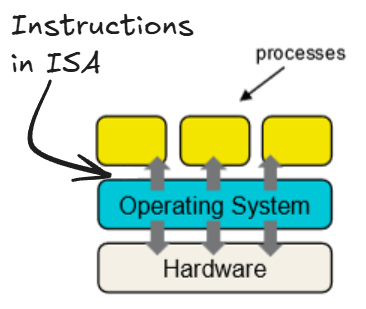
Virtual Machine Monitor (VMM / Hypervisor)
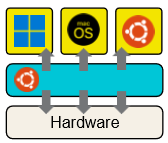
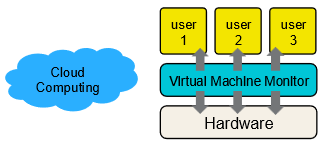
A Virtual Machine Monitor (VMM), also known as a Hypervisor, is a software or firmware layer that virtualizes physical hardware assets and arbitrates access among multiple guest virtual machines.
Key Responsibilities
- Hardware Interface Presentation: Presents the illusion of dedicated physical hardware to each guest OS.
- Resource Allocation & Multiplexing: Dynamically distributes CPU cycles, physical RAM frames, and I/O bandwidth across active VMs.
- Inter-VM Isolation: Prevents bugs, crashes, or security compromises in one VM from affecting neighboring VMs or the host hardware.
Key Motivations & Use Cases
- Software & OS Compatibility: Runs software compiled for different OS environments (e.g., running Linux binaries alongside Windows on a single host).
- Development & Testing: Enables safe testing of unverified kernel modifications or multi-platform application code.
- Security Isolation: Enforces hard boundaries; compromised guest instances remain sandboxed within their virtual environment.
- Cost & Resource Efficiency: Consolidates multiple physical server workloads onto a single machine and enables live VM migration across physical host pools in cloud infrastructure.
Core Design Goals of Virtualization
Architecting an effective hypervisor requires balancing five fundamental properties:
flowchart LR
    Fidelity["<b>1. Fidelity</b><br/>Software behaves identically to native execution."]
    Manageability["<b>2. Manageability</b><br/>Easy provisioning, snapshotting, and migration."]
    Isolation["<b>3. Isolation</b><br/>Resource & security boundaries between VMs."]
    Performance["<b>4. Performance</b><br/>Minimal virtualization overhead."]
    Scalability["<b>5. Scalability</b><br/>Supports many concurrent VMs efficiently."]
Virtualization Execution Paradigms
1. Virtualization via Full Simulation (Emulation)
The VMM interprets every guest instruction in software, simulating CPU registers, memory access, and device I/O.
- Advantage: Highly flexible; allows running guest software compiled for a completely different target architecture (e.g., ARM on x86).
- Disadvantage: Severe performance penalty (orders of magnitude slower than native execution).
2. The VMM Approach: Trap-and-Emulate
To achieve native execution speed, modern hypervisors run guest instructions directly on the physical CPU, intervening only when the guest attempts privileged operations:
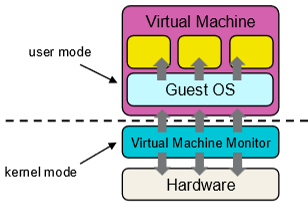
- VMM Mode: Operates in physical Kernel Mode (Supervisor / Ring 0) with full hardware control.
- Guest OS Mode: Deprivileged to execute in User Mode (Ring 3).
Execution Workflow
- Non-Privileged Instructions: Execute directly on the physical CPU at full hardware speed without VMM intervention.
- Privileged Actions: When the guest OS attempts a privileged operation (e.g., issuing disk I/O, modifying control registers, halting the CPU), the CPU triggers a hardware trap to the VMM.
- Emulation & Resume: The VMM intercepts the trap, emulates the intended hardware behavior safely, updates the virtual guest state, and resumes guest execution.
sequenceDiagram
    autonumber
    participant Guest as Guest OS (User Mode / Ring 3)
    participant CPU as Physical CPU Hardware
    participant VMM as VMM / Hypervisor (Kernel Mode / Ring 0)

    Guest->>CPU: Execute Non-Privileged Instruction (e.g., ADD, MOV)
    CPU-->>Guest: Execute natively at full hardware speed
    Guest->>CPU: Execute Privileged Action (e.g., HALT, I/O, Modify Page Table)
    CPU->>VMM: Hardware Trap / Exception (Privileged Violation)
    Note over VMM: Intercept trap & emulate expected hardware behavior
    VMM->>CPU: Update Virtual Guest State & Resume Execution
    CPU-->>Guest: Continue Guest Execution
Example: Handling the HALT Instruction
When an idle guest OS issues a HALT instruction to sleep the CPU:
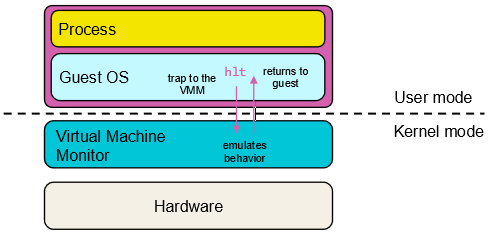
- Executing
HALTin deprivileged User Mode causes a hardware privilege exception trap. - The trap transfers control directly to the VMM.
- The VMM catches the exception, emulates the behavior of the
HALTinstruction, and returns the expected state back to the Guest OS.