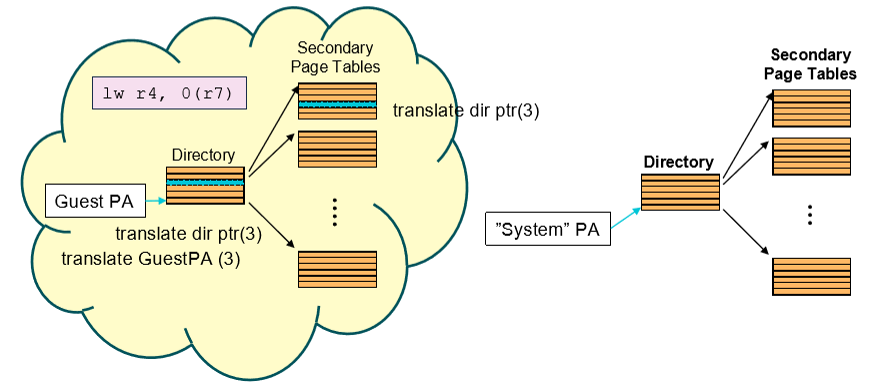
Type-1 and Type-2 Hypervisors
Type 1 (bare metal hypervisor)
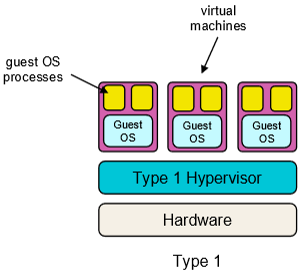
Type 2 (hosted hypervisor)
Virtualizing the x86 Architecture
Challenge of the trap-and-emulate approach
- x86 architecture was not fully virtualizable
Problems: - Some privileged instructions behave differently when run in unprivileged mode
popfdoes not trap when it cannot modify system flags
- Hardware-managed TLB
- VMM cannot easily interpose on a TLB miss
Paravirtualization
- Change the guest OS to better cooperate with the VMM with a hypervisor
- e.g. VMM can provide a “hypervisor API” so guest can perform certain functions
- Sacrifices transparency for better performance
Binary Translation
- Run guest OS code under control of a binary translator
- Rewrites privileged instructions with emulation at runtime (may trap to VMM)
- Incurs overhead, but can be kept small
Hardware Support
- Intel and AMD added virtualization support in 2005 (intel VT -x, AMD-V)
Virtualizing Privileged Instructions
For privileged instructions that causes a trap (when executed at user level):
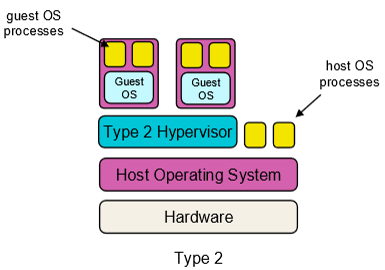
- Trap to VMM, handle the instruction, return to guest OS or process (trap and emulate)
For privileged instructions that do not trap:
- with paravirtualization ― modify guest OS to call into the VMM
- with binary translation ― rewrite guest OS instructions to emulate or call into VMM
- with hardware support ― add a new CPU mode and instructions to support trap-and-emulate
Virtualizing Events
VMM receives interrupts and exceptions (faults and syscalls)
Need to vector events to the correct VM
- with paravirtualization ― VMM notifies guest OS using an event queue
- With full virtualization ― call into the guest OS from VMM
- With hardware support ― hardware delivers events directly to the guest OS
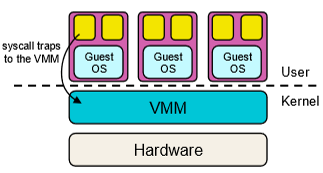
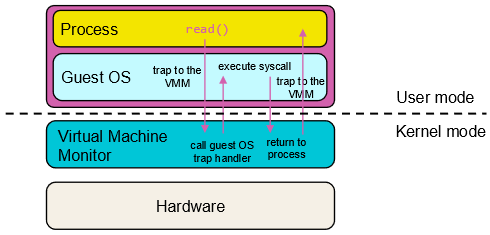
System call
Process invokes a system call (
read())
Assume full virtualization (no paravirtualization or hardware support)
What needs to be Virtualized?
- Privileged instructions
- Events (exceptions and interrupts)
- CPU (PC, cause registers)
- I/O devices
- Memory (shared among all guest OSes)
Virtualizing the CPU
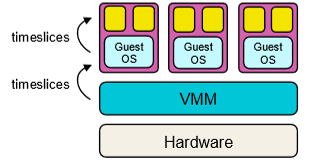
VMM needs to schedule multiple VMs on the CPU
Reuse scheduling techniques
- Time slice the VMs (same time given by CPU to hypervisor & guest OSes)
- Typically a simple scheduler (eg. round robin)
- Each VM will time slice its guest OS/applications during its quantum
Virtualizing Memory
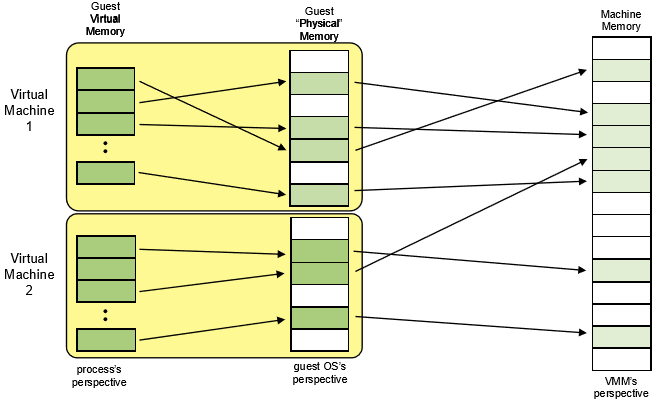
Shadow Page Tables
- VMM maintains shadow page tables for each VM
- Shadow page tables map from virtual pages in the VM to physical pages allocated by the VMM
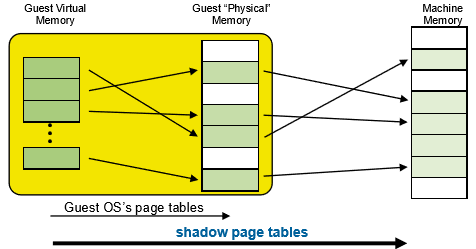
- MMU points to shadow page tables
- When VM tries to change MMU to point to different page table:
- traps to VMM which updates MMU to point to the shadow page table
- Keeping shadow page tables in sync with guest page tables:
- Mark pages of guest OS page tables as read only
- When guest OS writes to page table, trap to VMM, VMM updates shadow page table
- VMM can also swap out pages and indicate this in the shadow page tables
- Con:
- Los of overhead to trap to the VMM
Virtualizing I/O
Challenge:
- Lows of I/O devices
- We don’t want to write virtualized device drivers for all possible I/O devices
One approach:
- Run real device drivers in the VMM
- VMM presents simple virtual I/O devices to guest VMs
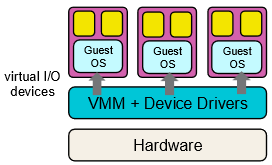
Can optimize using paravirtualization or specialized hardware
Hardware Support for Virtualization
Most modern CPUs provide virtualization support in CPUs in hardware
- Intel VT-x, AMD-V, RISC-V H-extension, MIPS
Privileged Instructions - New execution mode: non-root mode
- Traps from VM processes go to the Guest OS
Interrupts - Hardware delivers then directly to the correct VM
I/O - SR-IOV virtualizes I/O devices (eg. NIC, storage device)
- IO MMU (translates guest physical addresses to host physical addresses)
Memory - Intel Extended Page Tables (EPT) virtualize page tables
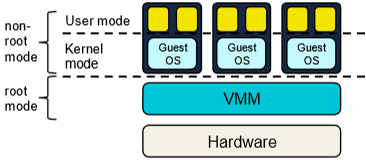
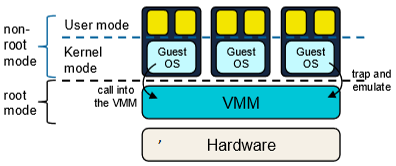
Guest OS Page Table Walk (Nested Page Table)
Two-level page table in the Guest OS and Two level page table in the hypervisor