Abstract
File System Reliability encompasses the mechanisms used to protect persistent data against system crashes, power failures, media defects, and human errors. Because complex filesystem operations require multi-block updates (e.g., writing data, bitmaps, and inodes), an unexpected crash midway through an operation can leave the filesystem in an inconsistent state. Operating systems address this Crash Consistency Problem using recovery strategies ranging from post-crash scanners (
fsck) and Ordered Writes to modern Journaling (Write-Ahead Logging).
Threats & The Crash Consistency Problem
File systems face three primary categories of data loss threats:
graph TD
    Threats["Data Loss Threats"] --> Deletion["<b>1. Deletion / Malware</b><br/>Mitigation: Periodic backups"]
    Threats --> DiskFail["<b>2. Physical Disk Failure</b><br/>Mitigation: Hardware/Software RAID replication"]
    Threats --> Crash["<b>3. System Crash / Power Loss</b><br/>Mitigation: Crash consistency protocols"]
The Multi-Block Update Problem
Most high-level file operations require writing multiple physical blocks to disk. For instance, creating a new file involves allocating an inode in the inode bitmap, writing the new inode metadata, and adding a new entry to the parent directory block.
If a crash occurs midway through a multi-block update, the file system is left in an inconsistent state.
Case Study: Appending a Data Block
Consider appending a new data block to an existing file, which requires writing three distinct blocks:
- Data Block (): The actual user contents.
- Data Bitmap (): Updates the free-block map to mark block as allocated.
- Inode Block (): Updates the file’s size and adds a pointer to block .
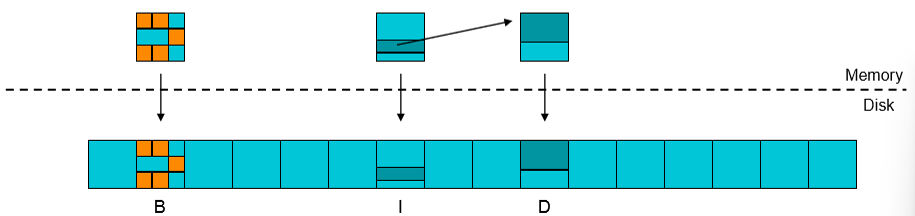
Assuming single-block disk writes are atomic, a crash occurring mid-operation yields three partial write failure scenarios:
flowchart TD
    Crash["System Crash During Block Append"] --> Case1["<b>Only Data ($D$) Written</b><br/><i>Outcome:</i> No structural harm, but data is lost (unreferenced by inode)."]
    Crash --> Case2["<b>Only Inode ($I$) Written</b><br/><i>Outcome:</i> <b>File Corruption</b>. Inode points to unallocated garbage data."]
    Crash --> Case3["<b>Only Bitmap ($B$) Written</b><br/><i>Outcome:</i> <b>Space Leak</b>. Block marked as allocated, but unreachable by any file."]
| Partial Write Case | Disk State | System Impact / Outcome |
|---|---|---|
| Only Data Block () | written, and unwritten | Safe. The write is effectively lost as if it never occurred. |
| Only Inode () | written, and unwritten | Severe File Corruption. Reading the file returns uninitialized garbage data. |
| Only Bitmap () | written, and unwritten | Space Leak. Storage block is marked as used but cannot be reclaimed or read. |
Approaches to Solving Crash Consistency Problem
Approach 1: File System Checker (fsck)
Early Unix systems used an offline utility called fsck (File System Check) that executes during system reboot following an unclean shutdown.
flowchart LR
    Boot["System Boots After Crash"] --> Scan["fsck Scans Disk Structure"]
    Scan --> CheckBitmaps["Audit Bitmaps vs Inode Pointers"]
    Scan --> CheckLinks["Audit Inode Link Counts vs Directories"]
    CheckBitmaps --> Repair["Repair Inconsistencies or Notify Admin"]
    CheckLinks --> Repair
Common Repairs
- Reclaim Leaked Blocks: If a bitmap bit is set to but no inode points to that block,
fsckclears the bitmap bit. - Fix Discrepant Link Counts: Adjusts the inode reference count to match the actual count of directory entries pointing to it.
- Recover Lost Files: Unreferenced inodes with non-zero link counts are moved to a
/lost+founddirectory.
Drawbacks
- Extreme Recovery Latency:
fsckmust perform a full traversal of all inodes and directory structures on disk (). On multi-terabyte drives, this scan can take hours. - Potential Data Loss: Cannot restore file contents; can only restore structural integrity, sometimes leaving files containing garbage data.
Approach 2: Ordered Writes
Ordered Writes prevent severe structural corruption by enforcing strict dependency ordering on disk writes so that invalid pointer references are never created.
Core Ordering Rules
- Initialize target data/bitmap blocks before writing pointers to them in inodes.
- Nullify existing pointers to a block before reusing it.
- Set a new pointer to a resource before clearing the old pointer (e.g., during atomic
rename).
Safe Append Sequence
When appending a block to a file, data and bitmap blocks are flushed before the inode pointer is committed:
flowchart LR
    Data["1. Data Block (D)"] --> Bitmap["2. Bitmap Block (B)"] --> Inode["3. Inode Block (I)"]
- Pros: Eliminates severe filesystem corruption without requiring an offline scan on reboot.
- Cons: Synchronous write ordering introduces high latency overhead. Space leaks can still occur, requiring background cleaning routines.
Approach 3: Journaling (Write-Ahead Logging)
Modern file systems (e.g., Linux ext4, Windows NTFS, macOS APFS) utilize Journaling (Write-Ahead Logging) to achieve fast crash recovery and guaranteed consistency.
Core Concept
Before writing changes to their permanent home locations on disk, the file system writes a description of the intended updates into an append-only log file called the Journal.

Journal Transaction Structure
The journal is managed as a circular buffer composed of transaction records:
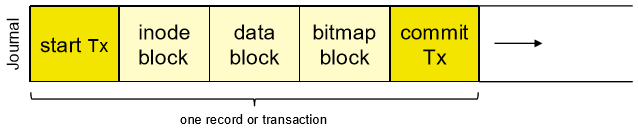
- Transaction Start Block (
Tx Start): Contains the Transaction ID and metadata. - Block Records / Payloads: The actual modified blocks (data, inode, bitmap).
- Transaction Commit Block (
Tx Commit): A single block written only after all prior payload blocks are flushed. A transaction is considered finalized and durable only when the commit block is fully written to disk.
Journaling Lifecycle & Checkpointing
sequenceDiagram
    autonumber
    participant App as Application
    participant Journal as Journal (On-Disk Log)
    participant Home as Home Disk Locations

    App->>Journal: 1. Write Tx Start & Modified Block Payloads
    App->>Journal: 2. Write Tx Commit Block (Transaction Finalized)
    Note over Journal,Home: --- Checkpointing Phase ---
    Journal->>Home: 3. Copy modified blocks to final Home Locations
    Journal->>Journal: 4. Clear/Recycle Journal Transaction
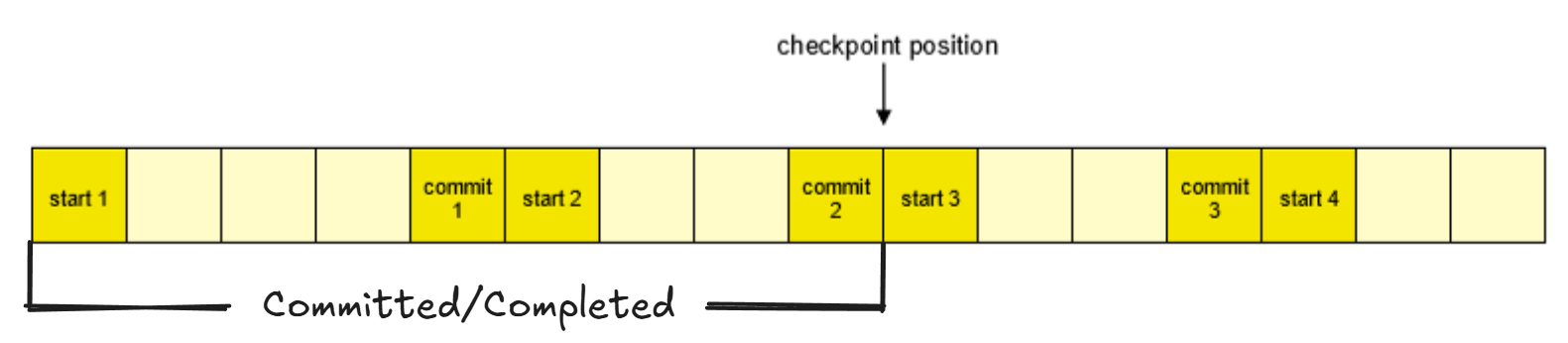
- Checkpointing: The process of copying committed blocks from the journal to their permanent “home locations” on disk, allowing the journal space to be reclaimed.
- Crash Recovery Protocol:
- Scan the journal on boot.
- Replay Committed Transactions: Re-apply all changes from transactions that have a valid
Tx Commitblock but were not yet checkpointed (idempotent operation). - Discard Uncommitted Transactions: Ignore partial transactions lacking a
Tx Commitblock.
Summary Comparison of Reliability Strategies
| Metric | File System Checker (fsck) | Ordered Writes | Journaling (Write-Ahead Logging) |
|---|---|---|---|
| Recovery Mechanism | Full offline disk scan on boot | Enforces strict write dependency ordering | Replays append-only transaction log |
| Boot Recovery Time | Very Slow (Hours on large drives) | Instant (No scan required) | Fast (Seconds, proportional to log size) |
| Write Performance | Normal (No runtime ordering penalty) | Slow (Blocked on synchronous writes) | Fast (Sequential log writes, background flushing) |
| Space Overhead | Zero | Zero | Small fixed journal partition |
| Write Amplification | (Data written to log, then home) |