Abstract
A Process is the fundamental operating system abstraction for a running program. While a program is a passive collection of instructions on disk, a process is an active instance executing in memory. The kernel virtualizes CPU execution and memory by managing process state transitions and tracking execution contexts inside a Process Control Block (PCB).
- Category: OS Kernel Primitives
- Primary Responsibilities: CPU virtualization, state tracking, resource encapsulation.
- Key Data Structure: Process Control Block (PCB /
task_structin Linux).
Process vs. Program
- Program: A passive entity residing on disk (an executable file containing machine code instructions, static data, and metadata).
- Process: An active entity residing in memory representing an ongoing execution instance of a program.
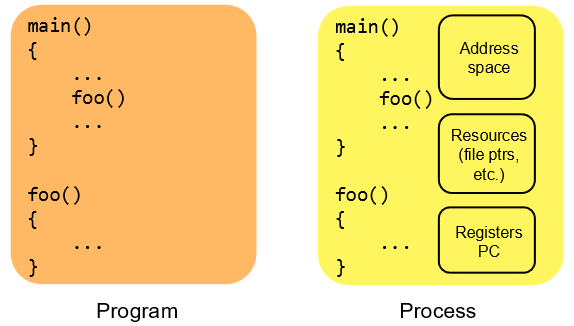
A single program can give rise to multiple distinct processes running simultaneously (e.g., opening multiple browser windows or running multiple shell instances).
Components of a Process
A process encapsulates all hardware and software state required to execute a program:
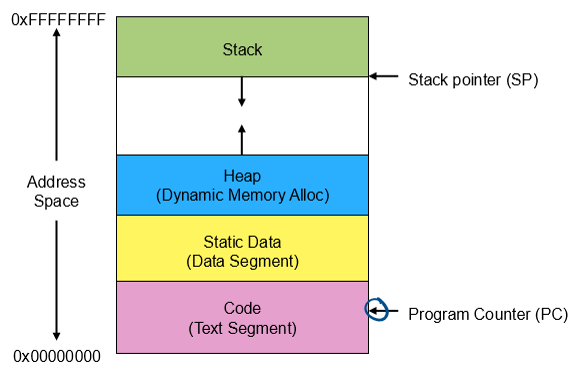
- Memory Address Space: The virtual memory region allocated to the process.
- Text (Code): Executable machine instructions.
- Data Segment: Initialized global and static variables.
- BSS Segment: Uninitialized global and static variables.
- Heap: Dynamically allocated memory requested at runtime (e.g.,
malloc(),new). Grows upward. - Stack: Manages function call frames, local variables, and return addresses. Grows downward.
- Hardware Context: Registers representing current CPU execution state.
- Program Counter (PC): Holds the memory address of the next instruction to execute.
- Stack Pointer (SP): Points to the top of the active execution stack.
- General Purpose Registers: Contain active temporary variables and calculation operands.
- OS Resource Identifiers: Open file descriptors, network socket handles, user/group security IDs (UID/GID), and inter-process communication handles.
Process Execution States
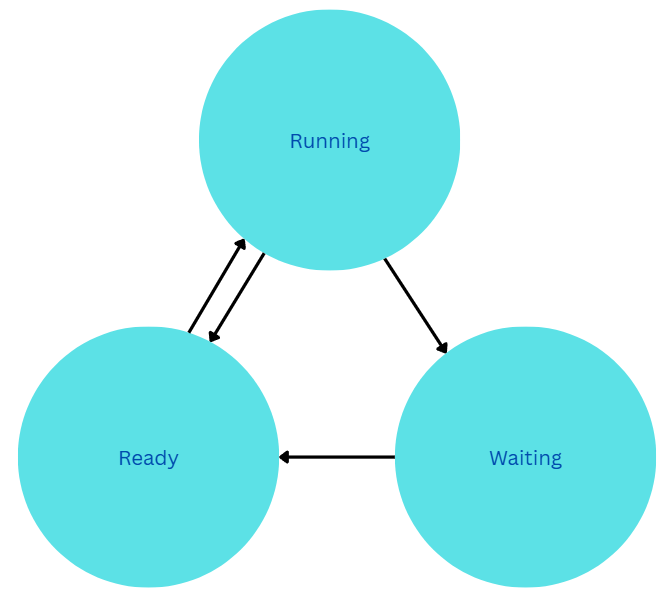
At any point in time, a process resides in one of three core execution states:
- Running: The process is currently executing instructions on a physical CPU core.
- Ready: The process is ready to execute but is waiting to be assigned a CPU core by the OS scheduler.
- Waiting (Blocked): The process cannot execute until an external event completes (e.g., I/O operation, timer, or signal arrival).
State Transition Mechanics
- Admitted Ready: The process is created and loaded into memory, ready for scheduling.
- Ready Running: The CPU Scheduler selects the process and dispatches it onto an available CPU core.
- Running Ready: The OS preempts the running process (e.g., via a periodic timer interrupt) to give CPU time to another process (Time-Sharing).
- Running Waiting: The process requests an operation that requires waiting (e.g.,
read()from disk) and yields the CPU. - Waiting Ready: The awaited external event completes (e.g., disk I/O interrupt fires), moving the process back to the run queue.
The Processing Illusion & The PCB
The OS provides every process with the illusion that it owns a dedicated CPU. In reality, a single physical CPU core is shared among many processes using Time-Sharing driven by periodic hardware timer interrupts.
The Process Control Block (PCB)
To pause and resume processes seamlessly without modifying application code, the OS kernel maintains a dedicated tracking data structure for every active process called the Process Control Block (PCB) (e.g., struct task_struct in Linux).
- Contains all of the information about a process
- Memory management information
- Scheduling and execution information
- I/O and file management
When the OS switches execution from Process A to Process B:
- It saves Process A’s register state, PC, and stack pointer into Process A’s PCB.
- It reloads Process B’s saved register state, PC, and stack pointer from Process B’s PCB into the CPU.
- It updates the CPU’s memory page table pointer to Process B’s address space.