Abstract
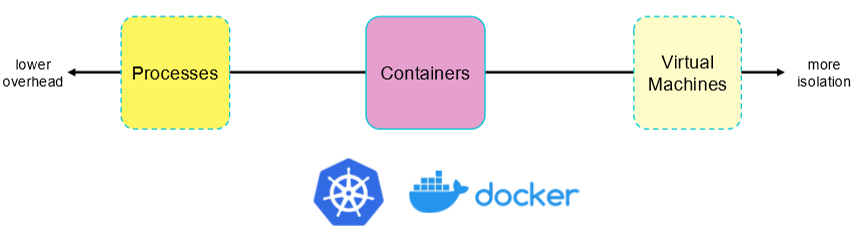
Unlike hardware hypervisors that emulate physical hardware for guest operating systems, Containers implement OS-Level Virtualization. Containers group processes together into an isolated environment that feels like a dedicated operating system. By leveraging kernel Namespaces to isolate system object naming and Control Groups (cgroups) to enforce resource limits, containers provide lightweight, high-performance virtualization sharing a single host kernel.
Hardware Virtualization vs. OS-Level Virtualization
Hypervisors virtualize physical hardware, requiring each Virtual Machine (VM) to run its own complete guest operating system kernel. In contrast, containers virtualize operating system abstractions, allowing multiple isolated process environments to run concurrently on a shared host kernel.
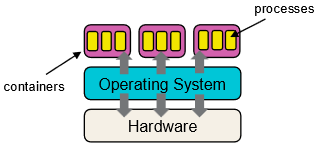
graph TD
    subgraph VMArch ["Hardware Virtualization (VMs)"]
        App1["App A"] --> GuestOS1["Guest OS Kernel"]
        App2["App B"] --> GuestOS2["Guest OS Kernel"]
        GuestOS1 --> Hypervisor["Hypervisor (Type-1 / Type-2)"]
        GuestOS2 --> Hypervisor
        Hypervisor --> HostHW1["Bare-Metal Hardware"]
    end

    subgraph ContainerArch ["OS-Level Virtualization (Containers)"]
        CApp1["App A (Libs)"] --> Engine["Container Runtime Engine"]
        CApp2["App B (Libs)"] --> Engine
        Engine --> SharedKernel["Shared Host OS Kernel (Namespaces & cgroups)"]
        SharedKernel --> HostHW2["Bare-Metal Hardware"]
    end
Architectural Trade-off Summary
| Attribute | Hardware Virtualization (VMs) | OS-Level Virtualization (Containers) |
|---|---|---|
| Virtualization Boundary | Hardware ISA (CPU, Memory, Devices) | Operating System Abstractions (APIs, System Calls) |
| Kernel State | Dedicated Guest Kernel per VM | Single Shared Host OS Kernel |
| Startup / Boot Time | Seconds to minutes (Full OS boot) | Sub-second (Process creation) |
| Resource Overhead | Heavy (Gigabytes RAM, full OS image) | Lightweight (Megabytes RAM, shared OS binaries) |
| Isolation Barrier | Hardware-enforced (Ring 0 vs Non-Root) | OS Kernel boundary (Namespaces & cgroups) |
Namespace Isolation
A Namespace restricts what system objects a group of processes can see. Containers achieve isolation by creating dedicated namespaces for key kernel resources.
flowchart TD
    KernelNS["Linux Kernel Namespaces"]

    KernelNS --> PID_NS["<b>PID Namespace</b><br/>Isolates Process IDs. Container PID 1 maps to a host global PID."]
    KernelNS --> NET_NS["<b>NET Namespace</b><br/>Isolates Network interfaces, IP addresses, port ranges, and routing tables."]
    KernelNS --> MNT_NS["<b>MNT Namespace</b><br/>Isolates File System mount points and directory visibility."]
    KernelNS --> USER_NS["<b>USER Namespace</b><br/>Isolates User IDs & Group IDs (Container root != Host root)."]
The Naming Isolation Principle
“If a process cannot name an object, it cannot access or affect it.”
Just as Virtual Memory Page Tables isolate process address spaces by restricting accessible physical addresses, namespaces isolate processes by restricting accessible system object identifiers.
Implementation Mechanics
- Object Tagging: The kernel tags every system object with the namespace identifier to which it belongs.
- Global-to-Local ID Mapping: The kernel tracks all processes on global data structures, mapping container-local IDs to global host PIDs:
- Example: A process running inside a container sees itself as
PID 1within its local PID namespace, while the host kernel tracks it globally asPID 10452.
- Example: A process running inside a container sees itself as
- Visibility Filtering: System calls like
psquery the kernel within the calling process’s namespace context, filtering out all processes tagged under different namespaces.
Resource Management via Control Groups (cgroups)
While namespaces isolate what a process can see, Control Groups (cgroups) limit how much a process can consume.
graph LR
    Container["Container (Process Group)"] --> CGroups["Linux Control Groups (cgroups)"]

    CGroups --> CPU["<b>CPU Utilization</b><br/>Core pinning & time-slice quotas"]
    CGroups --> RAM["<b>Memory Usage</b><br/>RAM caps & group OOM paging"]
    CGroups --> IO["<b>Block I/O</b><br/>Read/Write disk bandwidth throttles"]
    CGroups --> NET["<b>Network I/O</b><br/>Egress/Ingress bandwidth shaping"]
Default Process Granularity vs. Container Group Management
- Standard OS Behavior: The kernel schedules and manages resources independently for each individual process.
- Container Behavior (
cgroups): The kernel aggregates a tree of related processes into a logical control group, enforcing resource limits collectively across the entire set:- CPU Allocation: Restricts which physical CPU cores a container can execute on and caps total CPU quota per time period.
- Memory Limits: Sets maximum RAM thresholds; if the combined memory usage of a container group exceeds its limit, the kernel triggers group-level paging or the OOM (Out-of-Memory) killer.
- Disk & Network I/O: Limits read/write throughput (IOPS) to prevent noisy neighbor containers from saturating disk or network channels.