A Version Control System is a tool that records changes to a file or set of files over time, allowing you to recall specific versions later. This is critical for software developers to manage code history and collaboration.
1. Local VCS
This is a sophisticated method for saving different versions of a file on a single computer. Instead of just renaming files (e.g., Final_Essay_v1.doc, Final_Essay_v2.doc), the system stores a patch—a specific list of edits—for each revision.
- Mechanism: The system recreates a file by “stacking” all patches from the original version up to the desired point in time.
- Limitation: It is strictly for individual use and does not facilitate collaboration between different users.
2. Centralized VCS
Real-world projects are usually collaborative team efforts. Centralized VCS addresses the isolation of Local VCS by using a single server to host all versioned files.
- Workflow: Developers “check out” files from the central server, make their edits, and commit them back.
- Vulnerabilities:
- Single Point of Failure: If the server goes down, no one can collaborate or save versioned changes.
- Data Loss: If the server’s hard drive becomes corrupted and backups haven’t been made, the entire history of the project is lost. Developers would only retain the specific files they had checked out at that moment.
3. Distributed VCS (Git)
Git falls into this category. Unlike previous systems, clients do not just “check out” the latest snapshot of the files; they fully mirror the entire repository.
- Mechanism: Every person who “clones” a repository has a full backup of all the data, including the entire project history.
- Resilience: If a central server fails, any client repository can be copied back to the server to restore the project and its history.
- Workflow: Most work is done locally, and developers “push” or “pull” changes to sync with others, making the system faster and more reliable.
Git
Git is a relatively unique Distributed VCS in that it treats versions as “snapshots” of the repository filesystem instead of a list of file-based changes
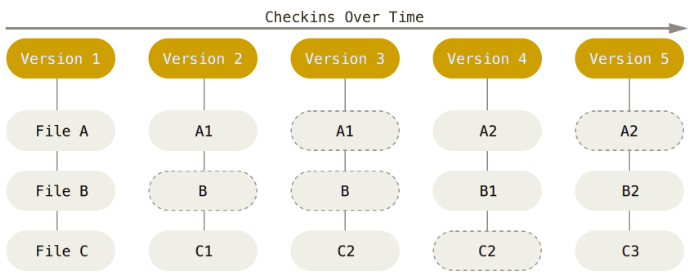
Every time you commit, or save the state of your project in Git, it basically takes a picture of what all your files look like at that moment and stores a reference to that snapshot. To be efficient, if files have not changed, Git doesn’t store the file again, just a link to the previous identical file it has already stored. Git thinks about its data more like a stream of snapshots.
In general, the Git workflow is as follows:
- Do a clone (clones the remote repository to the local machine)
- Modify the files in the working directory
- Stage the files (adds snapshots of them to your staging area)
- Do a commit (takes the files as they are in the staging area and stores that snapshot permanently to your Git repository)
- Do a push (upload the changes you made locally to the remote repository)
Steps to use Git:
- Create the Git Repository
- Clone the Git Repository locally (
git clone <repo_url> <folder_name>) - Add any files you need synchronized in the repository (
git add <files>) - Commit any changes you made (
git commit -m <commit_message>) - Push the changes to the repository (
git push)