Python vs. C
'''
The Hello World Program in Python
'''

# Python math library
from math import *

# Main function definition:
def main():
	# Statements on their own line
	print("Hello World")
	print("sqrt(4) is %f" %(sqrt(4)))

# Call the main function
main()
/*
The Hello World Program in C
*/
/* C math and I/O libraries */
#include <math.h>
#include <stdio.h>
/*main funciton definition:*/
int main(void) {
// statements and in a semicolon
printf("Hello World\n");
printf("sqrt(4) is %f\n", sqrt(4));
return 0; // main returns value 0
}Comments
- Multi-line Comments:
/* This is a multi-line comment*/ - Single-line Comments:
// This is a single line comment
Importing from Library
#include <library.h>
- All include statements appear on top of the program, outside of function bodies
Blocks
- Starts with
{and ends with} - includes
- Functions
- Loops
- Conditional Bodies
Main Function
int main(void) { }
mainfunction returns a value type of int → C’s name for specifying the signed integer type- returns
0: running to completion without error
- returns
void: does not expect to receive a parametermaincan take parameters to receive command line arguments Command Line Arguments
IMPORTANT
- A C program must have a function named
main, and its return type must beint(signed integer type)- The C
mainfunction has an explicitreturnstatement to return anintvalue
return 0if main function is successfully executed without errors- In C,
mainfunction is automatically called when the C program executes
Statements
- Each statement ends with a semicolon
; - Must be within the body of some function
Output
printf: prints a formatted string- Placeholders → additional arguments separated by commas
NOTE
Indentation: Have no meaning in C, but a good programming style to indent statements based on the nested level of their containing block Output: C’s
printffunction does not automatically print a newline character at the end → need to explicitly specify a new-line character (\n) in the format string when a newline is desired in the output
Compiling and Running C Program
To Run a C Program
IMPORTANT
Any changes made to the C Source File, the code must be recompiled with
gccto produce a new version of the Binary Executable
- Using a text editor to write and save the C source code program in a file
vim hello.c - Translate source code into a form that a computer system can directly execute
- Compiler: Program that translates C source code into a binary executable1 form that computer hardware can directly execute
gcc <input_source_file>- No Error Found →
- Create a Binary Executable file named
a.out - Allows specification of the Binary Executable file to generate using the
-oflaggcc -o <output_executable_file> <input_source_file>
- Create a Binary Executable file named
- Error Found → File will not be created / recreated, but an older version of the file from a previous successful compilation might still exist
- Execute the program
gcc hello.c # compile the hello.c file from text source to binary executable into default name (a)
./a.out # Run executable
NOTE
Some C compilers might need to be explicitly told to link in the math library:
-lm
gcc hello.c -lm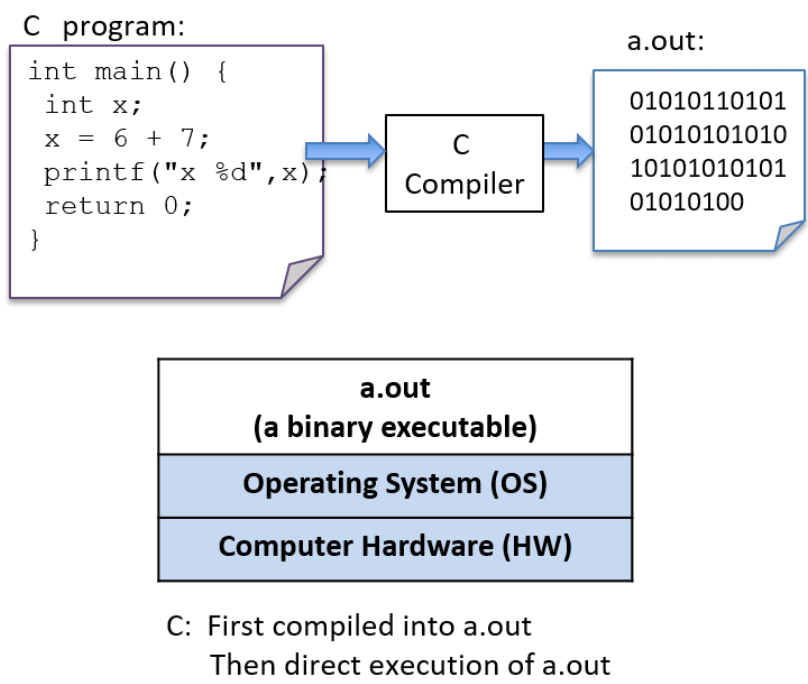
Due to gcc command line can be long, frequently the make utility is used to simplify compiling C programs and for cleaning up files created by gcc
Variables and C Numeric Types
Variables
- Scope: defines when the variable has meaning2 and its lifetime3
- Type: the range of values that the variable can represent and how those values will be interpreted when performing operations on its data
- Can only have only a single type
char: a character storing a single-byte integer- Often used to store a single ASCII character value (The ASCII numeric encoding of a character)
- Different type than a string in C
int: a whole numberfloat: a decimal numberdouble: a decimal number but with more digits behind the decimal point
- By convention, C variables should be declared at the beginning of their scope
IMPORTANT
All variables must be declared before they can be used
typename variable_name;
{
	// 1. Define variables in this block's scope at the top of the block
	int x;           // Declare x to be an int type variable and allocates space for it
	int i, j, k;     // Can define multiple variables of the same type like this
	char letter;     // A char storea a single ASCII value
	float winpct;    // winpct is declared to be a float type
	double pi;       // the double type is more precise than float

	// 2. After defining all variables, you can use them in C statements.
	x = 7;           // x stores 7 (initialize variables before using their value)
	k = x + 2;       // use x's value in an expression

	letter = 'A';        // a single quote that is used for single character value
	letter = letter + 1; // letter stores 'B' (ASCII value one more than 'A')

	pi = 3.1415926;

	winpct = 11/2.0;     // winpct gets 5.5, winpct is a float type
	j = 11 / 2;          // j gets 5: int division truncates after the decimal
	x = k % 2;           // % is C's mod operator, so x gets 9 mod 2 (1)
}
NOTE
C expects a
;after every statement →gccalmost never informs you when missed;The compiler indicates a syntax error on the line after the one with the missing;→gccinterprets the current line as part of the previous line