Array
INFO
C construct that creates an ordered1 collection of data elements of the same type and associates this collection with a single program variable
- One of C’s primary mechanisms for grouping multiple data values and referring them by a single name
- Useful for implementing list-like data structures and strings in C
Statically Declared Arrays
INFO
The total capacity (maximum number of elements that can be stored in an array) is fixed and defined when the array variable is declared
Comparison Between Python and C
The following shows a program that initializes and prints a collection of integer values.
Python
def main():
	# Create an empty list
	my_list = []

	# Add 10 integers to the list
	for i in range(10):
		my_list.append(i)

	# Set value at index 3 to 100
	my_list[3] = 100

	# Print the numer of list items
	print("list %d items:" %len(my_list))

	# Print each element of the list
	for i in range(10):
		print("%d" % my_list[i])

# Call main function
main()
C
#include <stdio.h>

int main(void){
	int i, size = 0;

	// Declare Array of 10 integerss
	int my_arr[10];

	// Set the value of each array element
	for (i = 0; i < 10; i++){
		my_arr[i] = i;
		size++;
	}

	// Set value at index 3 to 100
	my_arr[3] = 100;

	// Print the number of array elements
	printf("array of %d items:\n", size);

	// Print each element of the array
	for (i = 0; i < 10; i++){
		printf("%d\n", my_arr[i]);
	}

	return 0;
}
Similarities
- Individual elements can be accessed via indexing and both index values start at 0 → both languages refer the first element in a collection as the element at position 0
my_list[3] = 100 # Python syntax to set the element in position 3 to 100
my_list[0] = 5 # Python syntax to set the first element to 5my_arr[3] = 100; // C syntax to set the element in position 3 to 100
my_arr[0] = 5; // C syntax to set the first element to 5Differences
- The capacity of the list/array and how their sizes are determined
- Python
- The programmer does not need to specify the capacity of a list in advance or the type of values will be stored
- Python automatically increases a list’s capacity as needed by the program → Python’s
appendfunction automatically increases the size of the Python list and adds the passed value to the end
- C
- The programmer must specify its type and its total capacity
int arr[10]; // Declare an array of 10 ints char str[20]; // Declare an arry of 20 chars - Dictates the array layout in program memory
- Individual array elements are allocated in consecutive locations in the program’s memory → the third element is located in memory immediately following the second element and immediately before the fourth element
- The programmer must specify its type and its total capacity
- Python
IMPORTANT
In C, the programmers must explicitly keep track of the number of elements in the array
Array Access Methods
C ONLY supports indexing
int i, num;
int arr[10]; // Declare an array of ints, with a capacity of 10

num = 6; // Keeps track of how many elements of arr are used

// Initialize first 5 elements of arr (at indices 0-4)
for (i = 0; i < 5; i++){
	arr[i] = i * 2;
}

arr[5] = 100; // Assign the element at index 5 the value 100
NOTE
This program only used the first 6 of the 10 slots in the array It’s often the case when using statically declared arrays that some of an array’s capacity will remain unused → Needs another program variable to keep track of the actual size in the array (
numin this example)
Error Handling
It is up to the programmer to ensure that their code uses only valid index values when indexing into arrays → accessing an array element beyond the bounds on allocated array, the program’s runtime behavior is undefined
int array[10]; // Array of size 10 has valid indices from 0-9
array[10] = 100; // 10 is not a valid index into the array
WARNING
There is no bounds checking by the compiler or at runtime → The above code snippet will lead to unexpected behavior (the behavior might differ from run to run)
- Crashing
- Change another variable’s value
- No effect on your program’s behavior
- And More!!!
Arrays and Functions
Passing arrays to functions in C is similar to passing lists to functions in Python
- Function can alter the elements in the passed array or list
void print_array(int arr[], int size){
	int i;
	for (i = 0; i < size; i++){
		printf("%d\n", arr[i]);
	}
}[]after the parameter name tells the compiler that the type of the parameterarris array of int, notintlike parameter size
NOTE
There is no way to get an array’s size or capacity just from the array variable → must always pass the array’s size as well
Calling a Function with Array Parameter
int some[5], more[10], i;

for (i = 0; i < 5; i++){
	// initialize the first 5 elements of both arrays
	some[i] = i * i;
	more[i] = some[i];
}

for (i = 5; i < 10; i++){
	// initialize the last 5 elements of "more" array
	more[i] = more[i - 1] + more[i - 2];
}

print_array(some, 5); // prints all 5 values of "some"
print_array(more, 10); // prints all 10 values of "more"
print_array(more, 8); // prints just the first 8 values of "more"- The name of the array is equivalent to the base address of the array (0th element)
- When passing an array to a function, each element of the array is not individually passed to the function
- Function is not receiving a copy of the array
- Function is receiving an array parameter that gets the value of the array’s base address (pass by value function call semantics) → When function modifies the elements of an array that has passed as a parameter, the changes will persist when the function returns
void test(int a[], int size){
	if (size > 3) {
		a[3] = 8;
	}
	size = 2; // changing parameter does NOT change argument
}

int main(void){
	int arr[5], n = 5, i;

	for (i = 0; i < n; i++){
		arr[i] = i;
	}

	printf("%d %d", arr[3], n) // prints: 3 5

	test(arr, n);
	print("%d %d", arr[3], n); // prints: 8 5

	return 0;
}
The call in main to the test function passed the argument arr, whose value is the base address of arr in memory
- Parameter
a: functions gets a copy of this base address value → refers to the same address storage locations as its argument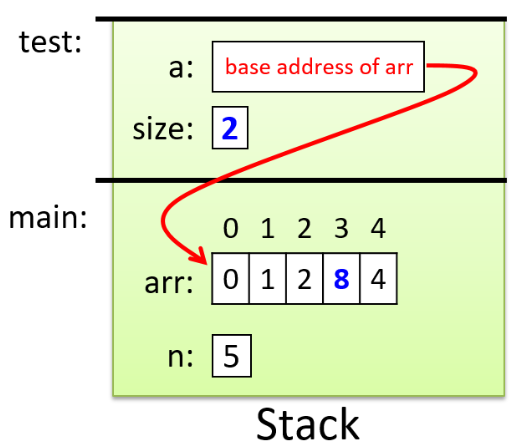
Other Variants
Footnotes
-
Ordered: each element is a specific position in the collection of values → there is an element at position 0, position 1, etc. NOTE: not necessarily sorted ↩