This section introduces Structs, which allow us to group different variables under a single name. In C, understanding structs requires a clear mental model of how they are laid out in the Stack and how they behave when passed to functions.
1. Defining and Initializing Structs
A struct is a custom data type. Using typedef allows us to use the name Point directly without prepending the struct keyword every time.
typedef struct Point {
    int x;
    int y;
} Point;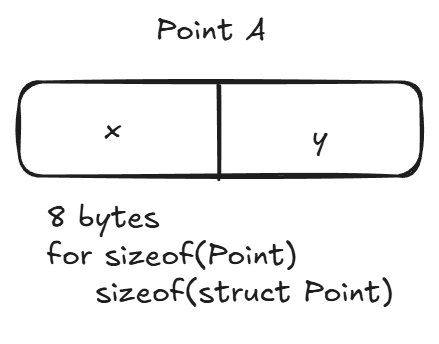
When you initialize a struct like Point p = {3, 4};, C allocates a contiguous block of memory on the stack large enough to hold all its members.
2. Memory Layout and Addressing
Members of a struct are stored in the order they are defined. The address of the struct is the same as the address of its first member.
| Variable | Memory Address | Size | Value |
|---|---|---|---|
p | 0x...40 | 8 bytes | {x: 3, y: 4} |
p.x | 0x...40 | 4 bytes | 3 |
p.y | 0x...44 | 4 bytes | 4 |
p2 | 0x...48 | 8 bytes | {x: 7, y: 8} |
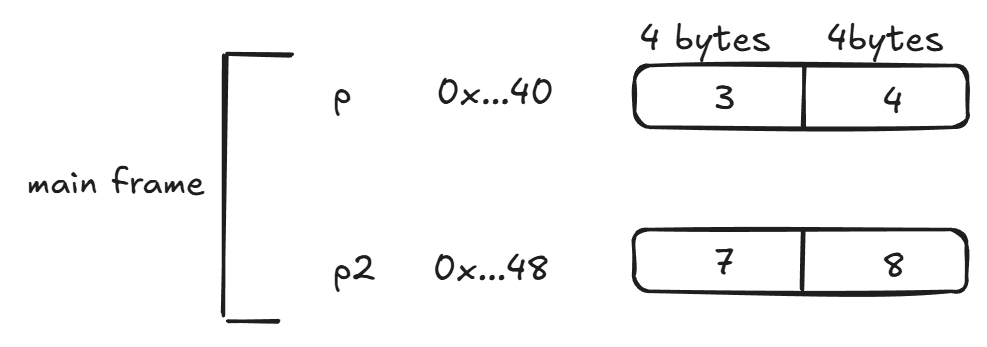
As shown above, p.y starts exactly 4 bytes (the size of an int) after the start of p.
3. Passing Structs: The “By Value” Trap
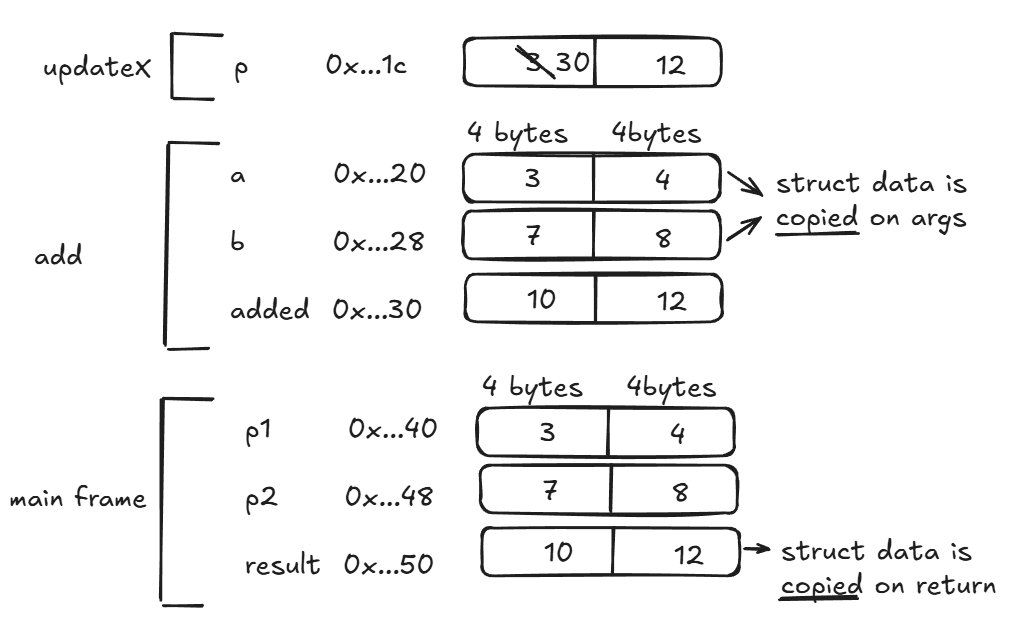
In C, when you pass a struct to a function, the entire struct is copied into the function’s stack frame. This leads to a common bug when trying to modify data.
The Problem: updateX
void updateX(Point p, int newX){
    p.x = newX; // This modifies a COPY, not the original p1
}
When updateX(p1, 30) is called:
- A new
Point pis created inupdateX’s memory. - The values from
p1(3 and 4) are copied into this new space. - The function changes the copy’s
xto 30. - The function returns, and the copy is destroyed. The original
p1inmainremains{3, 4}.
4. Example
Adding 2 points together, which the resulting Point
Point add(Point a, Point b){
	int x = a.x + b.x;
	int y = a.y + b.y;
	Point added = {x, y};
	return added;
}

void updateX(Point p, int newX){
	p.x = newX;
}

int main(){
	Point p1 = {3, 4};
	Point p2 = {7, 8};
	Point result = add(p1, p2);
	updateX(p1, 30);
}
WARNING
The update to the Point only changed the value in the argument data space, not the main frame value that we wished to change → need a different function definition to actually change the real data stored
5. Key Takeaways
- Contiguous Memory: Struct members live right next to each other in the order they are declared.
- Pass by Value: Passing a struct to a function copies every byte of that struct. For large structs, this can be slow.
- Modification: To actually change a struct inside a function, you must pass its address (a pointer), which we will explore in the next section.