ABSTRACT
This section covers the interface between C code and the network. We explore the start_server abstraction, the use of Function Pointers to handle requests, and the specific string formatting required to communicate via the HTTP protocol.
1. The Server Entry Point
To start a web server, we use a library function that abstracts away the complex socket setup (socket, bind, listen, accept).
void start_server(void(*handler)(char*, int), int port);Understanding the Function Pointer Argument
The first argument, void(*handler)(char*, int), is a Function Pointer. This allows start_server to execute a custom logic whenever a new request arrives.
void: The return type of the function being pointed to.char*: The first argument passed to the handler—the raw string of the incoming HTTP request.int: The second argument—the file descriptor (socket) used to send the response back to the browser.handler: The parameter name used insidestart_serverto invoke the callback.
2. Reading and Writing HTTP
HTTP is a text-based protocol. To send a valid response, we must use the write system call and follow a specific header format.
The HTTP Response Header
A valid response must start with a status line and headers, followed by a double newline (\r\n\r\n) to separate the metadata from the body.
char header[] = "HTTP/1.1 200 OK\r\nContent-Type: text/plain\r\n\r\n";\r(Carriage Return): Moves the cursor to the beginning of the line.\n(Newline): Moves the cursor down to the next line.200 OK: The Response Code (Standard success). Other codes include404(Not Found)500(Server Error)403(Forbidden).
text/plain: The MIME type, telling the browser how to interpret the bytes.
Implementation: simple_handler
void simple_handler(char* request, int response_socket){
    // Debugging: Print the incoming request to the server terminal
    printf("---start of request---%s\n---end of request---\n", request);
    printf("response socket: %d\n", response_socket);

    // Protocol requirement: Headers MUST be sent before the body
    write(response_socket, header, strlen(header));

    // The response body
    write(response_socket, "Hello!", 6);
    return;
}
3. Execution and Memory Context
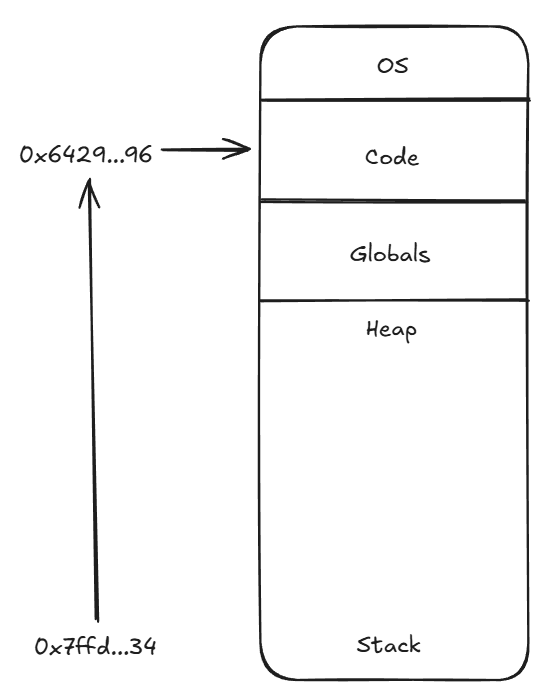
When we pass a function to start_server, we are passing its memory address.
int main(){
    int a[] = {1};
    printf("a: %p\nsimple: %p\n", &a, &simple_handler);
    start_server(&simple_handler, 8000);
}Output:
a: 0x7ffd...34
simple: 0x6429...96
Memory Regions
As seen in the output (e.g., a: 0x7ffd... vs simple: 0x6429...), these addresses reside in very different parts of memory:
- The Stack: Where local variables like the array
aare stored. - The Code (Text) Segment: Where the compiled instructions for
simple_handlerreside. The&simple_handlerpointer points here.
4. Summary of HTTP Components
| Component | Example | Description |
|---|---|---|
| Status Line | HTTP/1.1 200 OK | Version and success/error code. |
| MIME Type | Content-Type: text/plain | Format of the data (plain text, html, json). |
| Separator | \r\n\r\n | Crucial blank line between headers and body. |
| Body | Hello! | The actual content seen by the user. |