ABSTRACT
These notes explore how a server maintains Global State (memory that persists between different users) and how to use string manipulation to “route” different URLs to specific logic using query parameters.
1. Requirements and Specification
The server is designed to act as a dynamic counter. It must interpret specific incoming string patterns and return a valid HTTP response.
Server API Routes:
| Incoming Request Path | Logical Operation | Server’s Response Body |
|---|---|---|
GET / | (None) | "Hello! Use /increment or /add?<num>" |
GET /increment | THE_NUMBER = THE_NUMBER + 1 | "Recognized increment" |
GET /add?538 | THE_NUMBER = THE_NUMBER + 538 | "Added 538. New total: <total>" |
Target HTTP Response Format: To be recognized by a browser, the response must follow this exact byte-level structure:
- Status Line:
HTTP/1.1 200 OK\r\n - Headers:
Content-Type: text/plain\r\n - The “Magic” Blank Line:
\r\n(Crucial separator) - Body: The actual text message.
2. Implementation: simple-server.c
This implementation uses a global variable for persistence and strncmp for routing.
#include "http-server.h"
#include <string.h>
#include <stdio.h>

// Global Response Header
// Note the double \r\n at the end to create the required blank line
char header[] = "HTTP/1.1 200 OK\r\nContent-Type: text/plain\r\n\r\n";

// 1. Global State
// Resides in the Data Segment; persists as long as the server process runs.
// This allows the value to be shared across all connected users.
int THE_NUMBER = 0;

// Helper function to send the protocol-required header before the body
void send_ok(int socket, char* body){
    write(socket, header, strlen(header));
    write(socket, body, strlen(body));
}

void simple_handler(char* request, int response_socket){
    // Debugging: Print the incoming request string to the server terminal
    printf("---start of request---\n%s\n---end of request---\n", request);

    // 2. Request Routing Patterns
    char INCREMENT_PATTERN[] = "GET /increment";
    char ADD_PATTERN[] = "GET /add?";

    // Route 1: Increment Path
    if(strncmp(INCREMENT_PATTERN, request, strlen(INCREMENT_PATTERN)) == 0){
        THE_NUMBER += 1;
        send_ok(response_socket, "Recognized increment\n");
    }

    // Route 2: Add Path with Query Parameter (e.g., /add?538)
    else if(strncmp(ADD_PATTERN, request, strlen(ADD_PATTERN)) == 0){
        // 3. Parsing Query Parameters
        // Find the '?' in the request string
        char* query_ptr = strstr(request, "?");

        // Move pointer 1 byte past '?' to point to the digits
        char* addr_of_number = query_ptr + 1;
        int input_num = 0;

        // Parse the digits from the string into an integer variable
        sscanf(addr_of_number, "%d", &input_num);
        THE_NUMBER += input_num;

        // Format a dynamic response string
        char response_buf[100];
        snprintf(response_buf, sizeof(response_buf), "Added %d. New total: %d\n", input_num, THE_NUMBER);
        send_ok(response_socket, response_buf);
    }

    // Route 3: Default Root / Fallback
    else {
        send_ok(response_socket, "Hello! Use /increment or /add?<num>\n");
    }
}

int main(){
    // start_server is provided by the library to handle socket boilerplate
    start_server(&simple_handler, 8000);
    return 0;
}
3. Execution and Memory Context
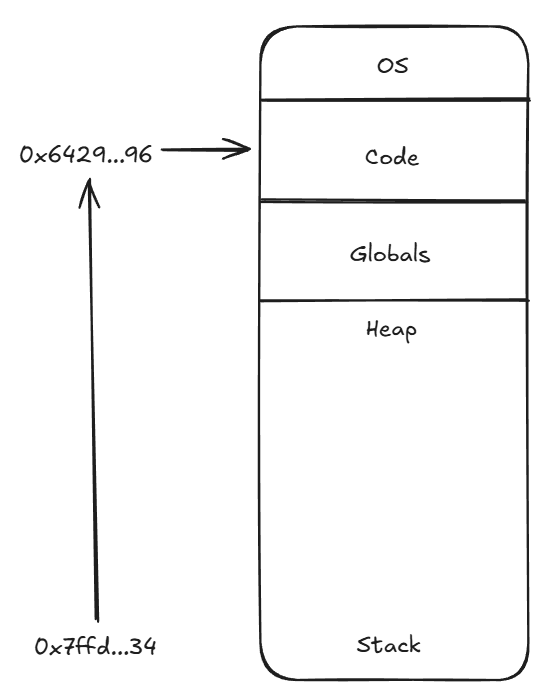
When we pass a function to start_server, we are passing its memory address.
int main(){
    int a[] = {1};
    printf("a: %p\nsimple: %p\n", &a, &simple_handler);
    start_server(&simple_handler, 8000);
}
Memory Regions
As seen in the output (e.g., a: 0x7ffd... vs simple: 0x6429...), these addresses reside in very different parts of memory:
- The Stack: Where local variables like the array
aare stored. - The Code (Text) Segment: Where the compiled instructions for
simple_handlerreside. The&simple_handlerpointer points here.
4. Summary of HTTP Components
| Component | Example | Description |
|---|---|---|
| Status Line | HTTP/1.1 200 OK | Version and success/error code. |
| MIME Type | Content-Type: text/plain | Format of the data (plain text, html, json). |
| Separator | \r\n\r\n | Crucial blank line between headers and body. |
| Body | Hello! | The actual content seen by the user. |