What is a Computer System
INFO
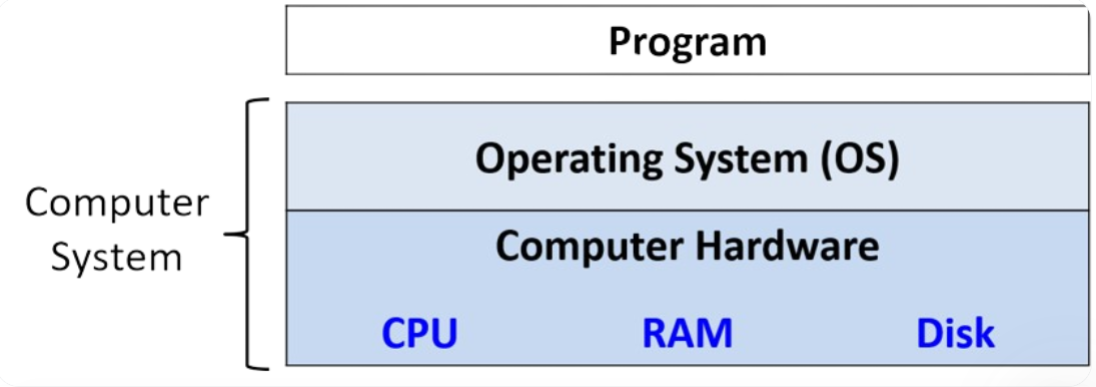
A computer system combines the computer hardware and special system software that together make the computer usable by users and programs
- Input/Output (IO) Ports → enable the computer to take information from its environment and display information to the user in some meaningful way
- Central Processing Unit (CPU) → runs instructions and computes data and memory addresses
- Random Access Memory (RAM) → stores the data and instructions of running programs. The data and instructions in RAM are typically lost when the computer system loses power
- Secondary Storage Devices → Things like hard disks stores programs and data even when power is not actively provided to computer
- Operating System (OS) → The layers between hardware of the computer and the software that a user runs on the computer
- Implements programming abstractions and interfaces → enable users to easily run and interact with programs on the system
- Manages the underlying hardware resources and controls how and when programs execute
- Implements abstraction to ensure that multiple programs can simultaneously run on the system in an efficient, protected, and seamless manner
IMPORTANT
The Input/Output (IO) ports, Central Processing Unit (CPU), Random Access Memory (RAM), and Secondary Storage Devices defines the computer hardware component of a computer system The Operating System represents the main software part of the computer system
Focus specifically on computer systems that:
- General Purpose → their function is not tailored to any specific application
- Reprogrammable → supports running a different program without modifying the computer hardware or system software
What Do Modern Computer Systems Look Like?
Typically 2 types of computer hardware systems:
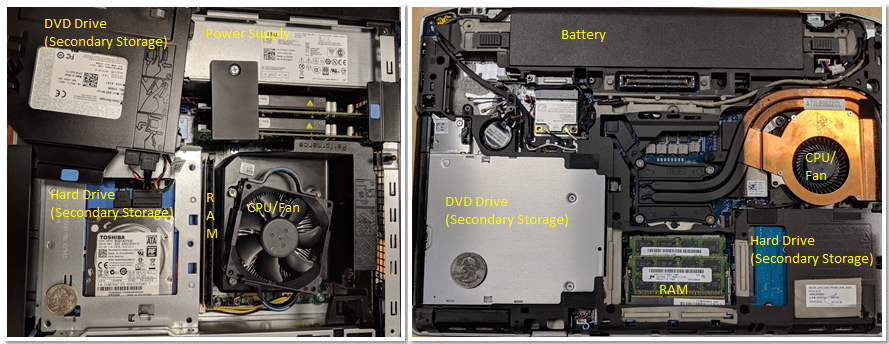
- Desktop Computer (left)
- The DVD/CD bay was moved to the side to show the hard drive underneath — the 2 units are stacked on top of each other
- Dedicated power supply helps provide the desktop power
- Power: 100W - 400W
- Weight: 5lb - 20lb
- Laptop Computer (right)
- Flatter and more compact
- Components tend to be smaller
- has battery instead of power supply → uses an external charger to supplement the battery as needed
- Power: 50W - 100W
What is common between the 2?
- The CPU is obscured by a heavy weight CPU fan, which helps keep the CPU at a reasonable operating temperature → overheating = permanent damage
- Has Dual Inline Memory Modules (DIMM) for their RAM units
- Laptop’s is significantly smaller than the Desktop’s
- Laptop’s is significantly smaller than the Desktop’s
NOTICE
Both contain the same hardware components, thought some of the components may have a smaller form or be more compact
Raspberry Pi
IMPORTANT
The trend in computer hardware design is toward smaller and more compact devices
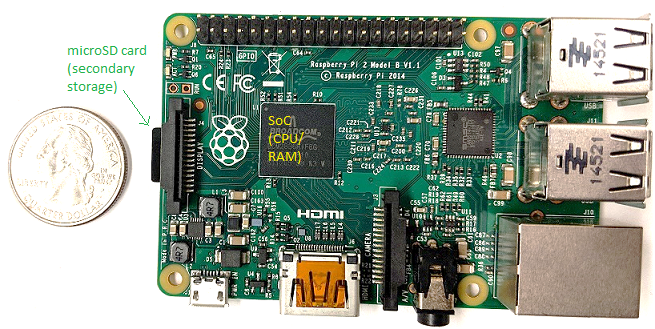
- Single-Board Computer (SBC): a device in which the entirety of the computer is printed on a single circuit board
- Contains a System-On-a-Chip (SOC) processor with integrated RAM and CPU
- Encompasses much of the laptop and desktop hardware
- This technology is also commonly found in smartphones
- Roughly the size of a credit card
- Weighs: 1.5oz
- Power: 5W
Multicore Processors
The computer systems mentioned above (Raspberry Pi, Laptops, and Desktops) including smartphones have multicore processors
- Their CPUs are capable of executing multiple programs simultaneously → Parallel Execution